
This post contains affiliate links. If you buy through one we may earn a commission at no extra cost to you. As an Amazon Associate I earn from qualifying purchases.
Quick Answer
Which treat camera works without a paid recording plan? The Furbo 360° Dog Camera gives you live view, two-way audio, and bark alerts with no subscription, but cloud video history, AI alerts, and longer recordings sit behind a paid tier, around $7 to $9 a month billed annually . A dog camera with treat dispenser is a wifi-connected camera that tosses a treat on command through an app, and the honest version of this purchase is: the hardware is the small cost, the plan is the recurring one.
Key Takeaways
- A dog camera with treat dispenser works through your home wifi, an app, and usually a cloud account, but basic treat tossing and live view do not always require payment .
- Furbo’s base 360° camera lists around $169, sometimes discounted toward $54 when bundled with an annual plan, which tells you the hardware price is a loss leader for the subscription [actual].
- Furbo Nanny, the paid tier, averages $6.99 a month billed annually (about $83.92 a year) and adds smart alerts, cloud recordings, and person detection [actual].
- Petcube’s roughly $10 a month plan buys three days of video history; its $17 a month plan stretches that to three months plus extra features .
- Wired found advanced AI alert features across brands commonly start near $8 a month on annual billing .
- No major 2026 U.S. recall tied to a leading treat-dispensing camera brand turned up in CPSC’s current listings as of early November [per CPSC].
- Check treat size compatibility before buying. Hoppers built for small kibble treats jam on anything oversized or oddly shaped.
- A regular indoor security camera from Eufy or Tapo can match video quality for less money if you do not need the treat launcher [CNET].
Doggy Rank IQ Tool
Dog Treat Camera Total Cost Calculator

The box price is the small number. Subscriptions and years of use are the real one.
Quick Answer and the main fit decision
The real decision is not which camera looks nicest in a product photo. It is whether you will pay a recurring fee for features you will actually use, or whether live view and a treat button cover your needs.
Here is the shortcut: if you mainly want to check on your dog during the workday and toss an occasional treat, a camera with free live view and no required subscription, like the base Furbo 360° tier, solves the problem. If you want searchable video history, bark-type classification, or automatic clips sent to your phone, budget for a plan, because that is where the real product lives.
A dog camera with treat dispenser is really two products stapled together: a camera and a software subscription. Buy the hardware for the lens and the chute. Buy the plan, if you buy one at all, for the data.
What is a dog camera with treat dispenser and how does it work
A dog camera with treat dispenser is a wifi camera mounted at dog height or above that streams live video to a phone app and includes a small motorized hopper that launches a treat when you tap a button. Most models add a microphone and speaker for two-way talk, motion and sound detection, and night vision.
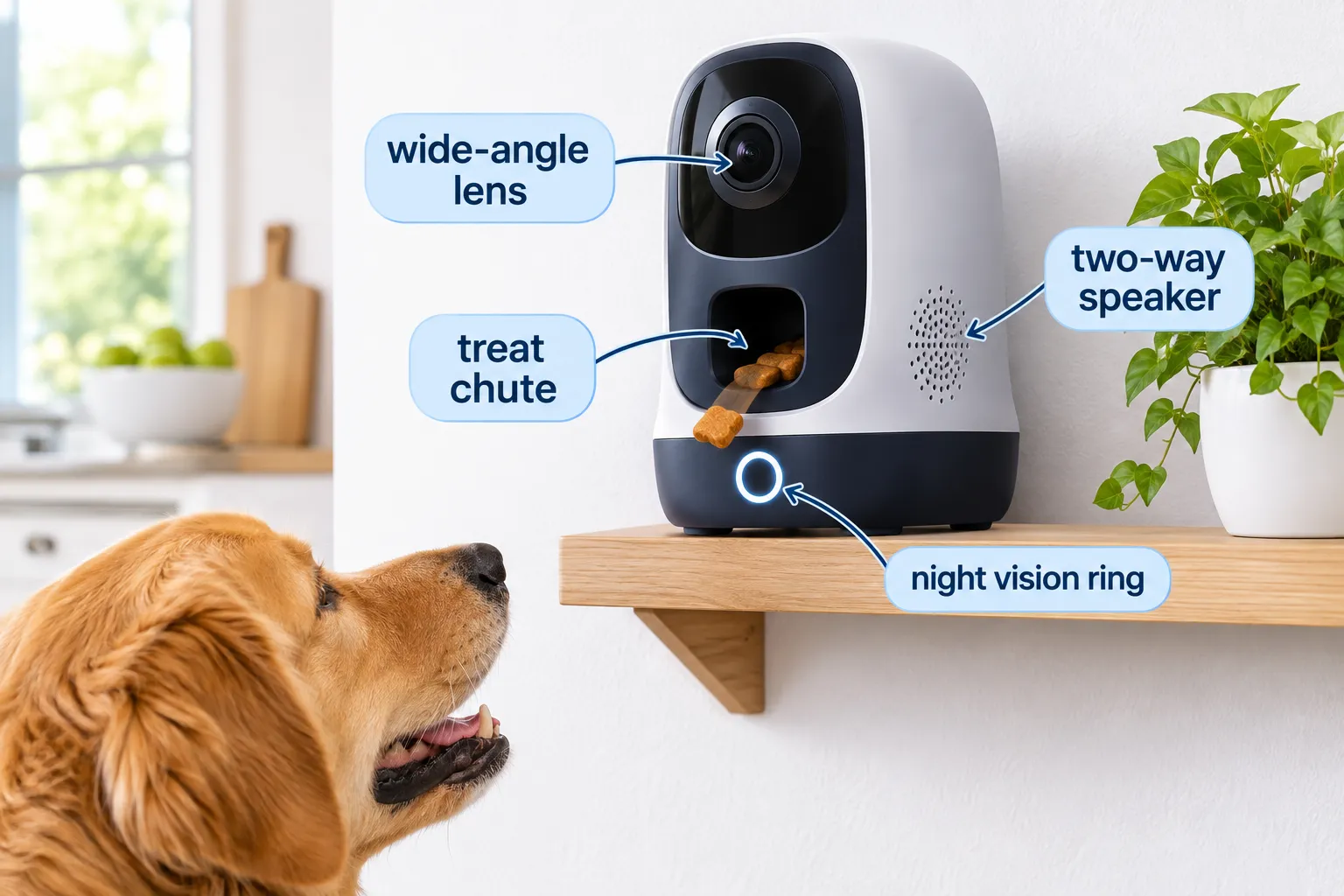
The mechanics are simple. Dry kibble-sized treats sit in a hopper. A small motor or solenoid pushes one treat through a chute and out a launch opening, usually a few feet into the room. The app sends that command over your home network or through the manufacturer’s cloud, depending on the model and your internet connection.
- Camera: fixed, pan-only, or full 360-degree rotation, depending on the model
- Hopper: holds a set volume of treats, cleaned by hand or dishwasher-safe on some models
- Alerts: motion, sound, bark-specific, or person-specific depending on software tier
- Audio: two-way talk so you can speak and hear the room
Decision rule: choose a 360-degree model if your dog roams multiple rooms or furniture heights; choose a fixed-angle model if the camera sits in one predictable spot, like a crate or a dog bed corner.
Best dog camera with treat dispenser brands
Furbo and Petcube lead the category, with generic 2K wifi treat cameras from smaller brands filling the budget tier. Furbo is the name most owners recognize, largely because of its AI bark and person alerts; Petcube has carved out a reputation around its roomier treat hopper.
Furbo’s current lineup spans a full-size 360° camera, a smaller Mini 360° model near $99 list price, and steep bundle discounts when paired with its Nanny subscription [per Furbo]. PCMag’s 2026 testing specifically credits the Furbo 360 for treat dispensing, color night vision, side-to-side panning, full 360-degree coverage, and bark alerts that worked in their tested setup without a required subscription .
Petcube, meanwhile, has pushed past hardware into a broader pet-care app that bundles camera footage with 24/7 certified-vet chat and AI guidance, according to an October 2026 company announcement [source]. That matters if you want one app for health questions and video, less if you just want a camera that throws treats reliably.
- Furbo 360° Dog Camera: full 360-degree rotation, improved two-way audio, improved night vision, treat tossing, bark alerts
- Petcube Bites 2 Lite: large dishwasher-safe treat dispenser, remote treat tossing, named a value pick in Yahoo’s November 2026 roundup
- Generic 2K wifi models: auto tracking, dual-band wifi, remote treat tossing at a lower upfront price
Common mistake: assuming every camera from a given brand shares the same subscription terms. Furbo’s Mini 360° and full 360° models use the same Nanny plan structure but different hardware prices, so check the specific model page before you buy [per Furbo].
How much does a dog camera with treat dispenser cost
Hardware for a treat-dispensing dog camera runs roughly $50 to $170 depending on model, discount timing, and whether you commit to an annual plan at checkout. Furbo’s 360° camera listed at $169, discounted from $210, with promotional bundle pricing closer to $54 when paired with annual Nanny billing [per Furbo].
That spread is the point. Manufacturers discount hardware heavily when you commit to a subscription, which is effectively a financing arrangement dressed up as a sale. If you only want the camera and never intend to subscribe, you may pay closer to full list price.
- Budget tier: $50-$100, generic 2K treat cameras, fewer AI features
- Mid tier: $99-$150, Furbo Mini 360°, Petcube Bites 2 Lite
- Premium tier: $150-$210, Furbo 360° full model, best coverage and night vision
Dog camera subscription plans and what they include
Subscription plans typically add cloud video history, AI-based alert classification, person or package detection, and longer clip storage; free tiers usually cover live view and basic motion alerts only. Furbo Nanny averages $6.99 a month on annual billing (about $83.92 a year), with a 30-day trial, adding smart alerts, cloud recordings, activity reports, and home-emergency alerts [per Furbo].
Petcube’s plans sit in a similar range: around $10 a month buys three days of recorded history, while $17 a month stretches storage to three months and adds features . Wired’s broader 2026 survey found advanced AI alert tiers across the category commonly start near $8 a month on annual billing .
| Plan tier | Typical monthly cost | What it usually includes | What it does not include |
|---|---|---|---|
| Free/no plan | $0 | Live view, basic motion alert, manual treat toss | Cloud history, AI classification, long clips |
| Entry paid | $7-$10 | Cloud recordings, bark/person alerts, short history | Extended storage, multi-camera discounts |
| Premium paid | $15-$17 | 3 months of history, richer AI tags, priority alerts | Hardware, professional monitoring |
Decision rule: if you check the live feed more than you review past footage, skip the plan. If you need proof of what happened while you were out, pay for history.
How do motion and sound alerts work on dog cameras
Motion and sound alerts work by comparing live video and audio against a baseline, then pushing a phone notification when the camera detects movement, barking, or in some models a specific sound type like a doorbell or crying. Free tiers often send generic motion pings; paid tiers refine those into categorized alerts, such as distinguishing a bark from background noise.
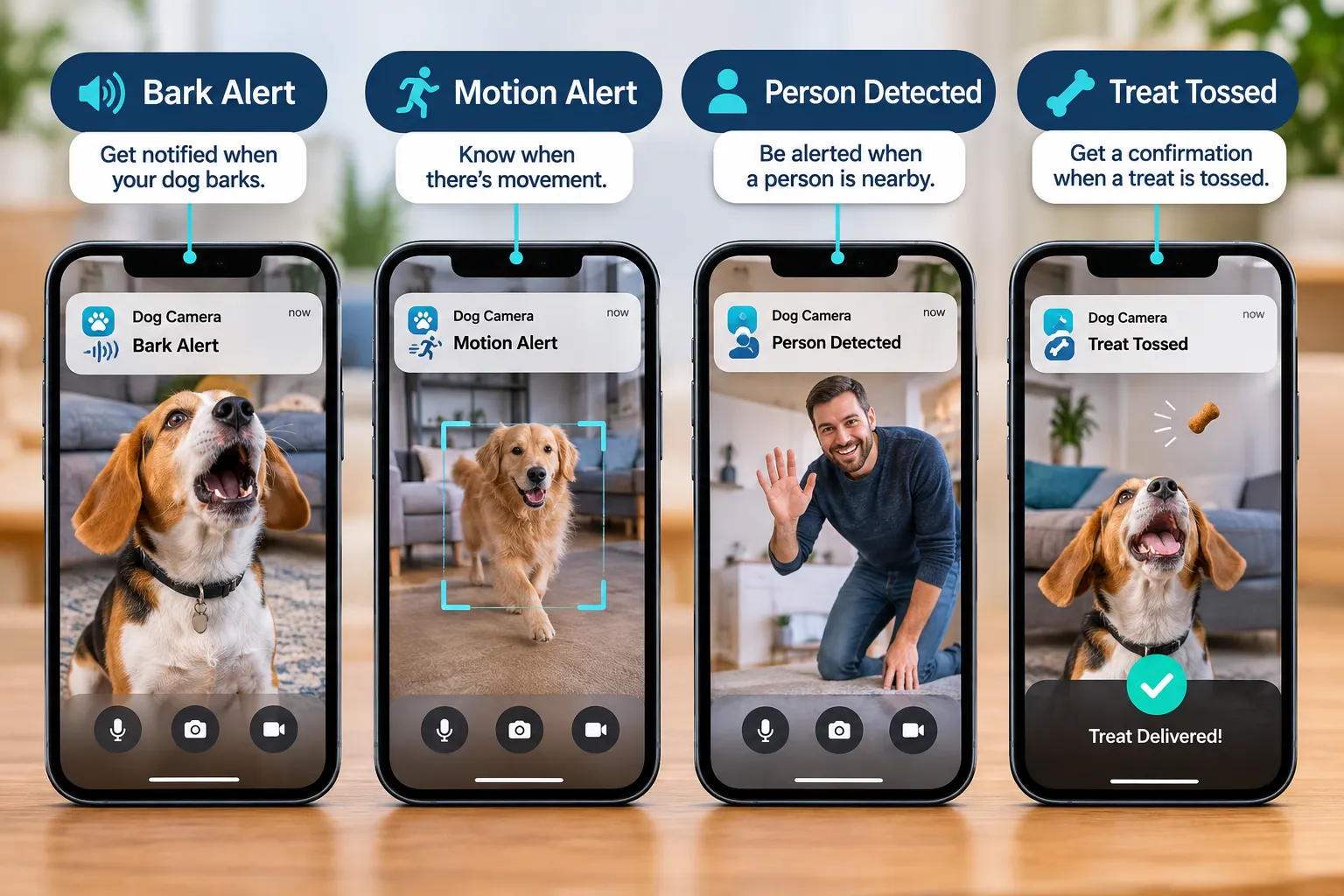
Wired’s 2026 review notes combined pan rotation, motion, bark, and voice detection, auto-tracking, and scheduled feeding bundled into premium tiers that generally require the paid plan to open up full classification . PCMag separately found Furbo’s barking alerts worked in their test configuration without a subscription, which is a meaningful exception worth confirming on the current product page before buying .
Edge case: apartment living with shared walls can trigger false alerts from neighbor noise or hallway movement, especially on sound-based detection. Adjust sensitivity settings after the first week rather than living with a flood of notifications.
Can you watch your dog live on your phone in real time
Yes. Live view is the one feature that remains consistently free across nearly every dog camera with treat dispenser on the market, including Furbo and Petcube’s base tiers. The video typically streams at standard or 2K resolution depending on model and your home internet upload speed.
Expect a short delay, usually one to three seconds, between real-time action and what appears on your screen. That delay matters if you are trying to time a treat toss to a specific behavior; a slightly delayed stream means your “sit” cue and the treat landing will not line up perfectly.
Dog camera with treat dispenser troubleshooting connection issues
Most connection problems trace back to wifi band mismatches, router distance, or an outdated app rather than a defective camera. Dual-band 5G and 2.4G models need the correct band selected during setup, and 2.4G generally has better range through walls even though 5G offers faster speed at close range.
- Restart the router and the camera, in that order, before contacting support
- Move the camera closer to the router during initial setup, then relocate after pairing
- Update the app; Furbo’s Android app received a notable October 2026 update focused specifically on connection stability, a reminder that firmware and app versions both affect reliability [per Google Play]
- Disable VPNs or guest-network isolation settings that block device-to-device communication
- Re-pair the camera entirely if alerts stop firing but live view still works, since that split often signals a cloud-account sync issue rather than a wifi problem
Common mistake: blaming the camera for a dead treat motor when the real cause is an empty or jammed hopper. Clean the chute first.
What are the alternatives to a dog camera with treat dispenser
A standard indoor security camera without a treat feature is the most practical alternative, and it often costs less while matching video quality. CNET’s 2026 comparison found products from Eufy, Tapo, and similar brands deliver high-resolution video, pan/tilt tracking, local storage, and pet-motion detection without the specialized launcher [CNET].
- Standard security camera: cheaper, often supports local SD storage instead of a forced cloud plan
- Automatic treat-only dispenser without a camera: useful if you just want scheduled feeding, not monitoring
- Pet sitter check-ins: solves the anxiety problem directly without any hardware at all
- Baby monitor repurposed for pets: works for basic live view in a pinch, lacks pet-specific alerts
Choose a plain security camera if you do not care about remote treat tossing and want to avoid the forced subscription upsell that treat cameras lean on.
Is a dog camera with treat dispenser worth it
It is worth it for owners who specifically want the remote treat-toss interaction and are comfortable either paying a modest monthly fee or accepting a free tier’s limits. It is a weaker purchase for owners who only want to watch their dog, since a cheaper plain camera does that job for less money [CNET].
The honest math: hardware plus a year of mid-tier subscription runs roughly $140 to $250 depending on brand and promotion, versus $30 to $80 for a no-subscription security camera with motion alerts [CNET; per Furbo]. Pay the premium only if the treat feature and AI alert classification genuinely change your daily routine, not because the product page makes it sound essential.
How often can you give treats remotely with a dog camera
Most hoppers allow unlimited manual tosses through the app, limited only by how many treats the hopper holds, which typically ranges from a few dozen to over a hundred small pieces depending on model and treat size. There is no software-imposed daily cap on most consumer models, though some apps let you schedule timed tosses for routine feeding.

Practical limit: refill frequency, not app permission, decides how often you can realistically use the feature. A hopper that holds 100 small treats needs refilling every few days with moderate use.
Dog camera with treat dispenser vs regular pet camera
A treat-dispensing camera adds a motorized hopper and launch mechanism; a regular pet camera skips that hardware and usually costs less for similar video and alert quality. If remote treat delivery is not a priority, a regular pet camera from a general security brand is the simpler, often cheaper choice [CNET].
Choose the treat-dispenser version if: your dog responds well to treat-based reinforcement and you want to interact during the day, not just observe.
Choose a regular pet camera if: you mainly want to confirm your dog is safe and calm, and you would rather spend the savings on the separation anxiety guide’s behavior-based approach instead of a gadget.
Can you use a dog camera without wifi or internet
No, not in any meaningful way. Nearly every consumer dog camera with treat dispenser depends on a home wifi connection to stream video and relay commands through the manufacturer’s app, and most also rely on cloud servers even for live view, not just for recorded history.
Some models can operate on a local network without active internet for live view on the same wifi, but remote access from outside your home, the main reason people buy these cameras, requires an internet connection and usually a cloud account. If your internet is unreliable, expect dropped streams and delayed treat commands regardless of brand.
Common mistakes people make with treat dispenser cameras
The most common mistake is buying based on the discounted hardware price without checking what the ongoing plan costs over a full year. A camera marked down to $54 with an annual plan attached can cost more over 12 months than a $169 standalone unit with no subscription at all.
- Assuming the treat hopper fits any treat; check the dimensions before buying, since oversized or irregularly shaped treats jam narrow chutes
- Sharing one account login across family members instead of using the app’s built-in multi-user or guest access feature, which creates a privacy and security gap
- Mounting the camera too high, which weakens the microphone’s ability to pick up a quiet whine or distress bark
- Ignoring firmware and app update prompts, which Google Play data shows directly affects connection stability [per Google Play]
- Buying the premium 360-degree model for a single small room where a fixed-angle budget camera would have worked fine
Best dog camera with treat dispenser for separation anxiety
For separation anxiety specifically, prioritize sound-based bark alerts and two-way audio over treat tossing, since the goal is noticing distress early and being able to speak calmly, not reward delivery. A camera is a monitoring tool here, not a behavior fix; it tells you something is wrong, it does not teach a dog to be comfortable alone.

If separation anxiety is the core concern, this article covers device shopping and plan costs only. For the behavior side, including the signs that matter and a structured plan, see the dedicated separation anxiety in dogs guide. Pair any camera purchase with training steps from a resource like our dog recall training guide, since responsiveness to cues built at home tends to transfer to remote interactions through a camera speaker.
Skip if and care checks
Skip a treat-dispensing camera if your dog has food guarding tendencies around sudden noises, since a mechanical treat launch can startle a dog mid-anxiety episode rather than soothe one. Skip it also if your household already has an unreliable internet connection, since nearly every feature depends on a steady stream.
- Skip if: your dog is on a strict portion-controlled diet, since remote treats are easy to over-administer without noticing
- Skip if: multiple people in the household would need separate logins and the model only supports one account
- Care check: wash the hopper per the manufacturer’s instructions; dishwasher-safe hoppers, like Petcube’s, reduce buildup that can jam the chute
- Care check: review the manufacturer’s privacy policy for video storage location and who can access shared footage before inviting family members onto the account
- Care check: verify CPSC listings periodically; no major recall tied to a leading treat-dispensing camera brand was found in the current CPSC database, but checking before a purchase remains good practice [per CPSC]
Compare the options on treat size, plan cost, and camera coverage before adding anything to cart, and check the dimensions of the hopper against the actual treats you feed.
Top 5 features that decide the purchase
- 360-degree coverage vs fixed angle, Furbo 360° Dog Camera’s full rotation covers multi-room movement that a fixed camera simply misses .
- No-subscription bark alerts, PCMag confirmed Furbo’s barking alerts functioned in their tested setup without a paid plan, a rare feature in this category .
- Treat hopper size and cleanability, Petcube Bites 2 Lite’s large dishwasher-safe dispenser reduces refill frequency and buildup-related jams .
- Dual-band wifi (5G/2.4G), generic 2K treat cameras with dual-band support adapt better to apartment routers with mixed-device interference.
- AI person/activity detection, Wired found this tier of feature commonly gated behind an $8-a-month plan, so confirm it is included before assuming your purchase has it .
Things to watch out for
The treat hopper is the part most likely to fail first, especially with treats that are slightly too large, crumbly, or irregularly shaped; check the manufacturer’s listed treat dimensions before buying any brand. Marketing photos rarely show the hopper jammed with crumbs, which is the single most common owner complaint across budget models.
- Shared-account access is often an afterthought in app design; a family member using the same login can delete footage or change alert settings without you knowing
- Cloud storage location and retention period vary by brand and are often buried several menus deep in the app, not on the product page
- Promotional bundle pricing (hardware discounted when paired with an annual plan) can make the true subscription cost less visible at checkout
- Night vision quality drops noticeably on budget models in larger or darker rooms, even when the spec sheet lists “night vision” without detail
- No current recall was found tied to a leading treat-dispensing camera brand as of early November 2026, but CPSC listings change, so checking before purchase is a reasonable habit, not paranoia [per CPSC]
Picks by use case and budget
Best for no-subscription live view and bark alerts: Furbo 360° Dog Camera w/ AI Alerts & Cloud Recording, Subscription Required, price band: premium tier, discounted bundle pricing available periodically. PCMag’s testing found its bark alerts worked without a required plan in their configuration, though cloud history still sits behind Furbo Nanny .
Best budget 360-degree treat tossing: 2K Pet Camera Treat Dispenser, 360°View Dog Camera with Phone App, 5G&2.4G WiFi 2-Way Talk Pet Cam Indoor for Cats Remote Treat Tossing, Motion Alerts, Auto Tracking, price band: budget to mid tier. Dual-band wifi helps in apartments with router interference.
Best for auto tracking and photo organization: 2K Pet Camera Treat Dispenser, AI Photo Album, Dog Camera with 360° Auto Tracking & 5G/2.4G WiFi, 2-Way Talk, Remote Treat Tossing, Motion Alerts for Cats Indoor, price band: mid tier. The built-in AI photo album organizes clips without a separate subscription layer for basic use.
Disclosure: these are affiliate links. Doggy Rank IQ may earn a commission on qualifying purchases at no added cost to you. Recommendations follow the reader’s stated need and the available evidence, not commission size.
Check current availability for the best-fit model before deciding, since bundle pricing shifts with promotions.
Frequently Asked Questions
Which treat camera works without a paid recording plan? Furbo’s 360° Dog Camera offers live view, two-way audio, and in PCMag’s tested configuration, bark alerts, without requiring the Nanny subscription, though cloud recordings and extended history still require a paid plan .
What treat sizes fit, and how do you share access safely? Check the manufacturer’s listed hopper dimensions before buying; oversized or crumbly treats are the most common cause of jamming. For shared access, use the app’s built-in multi-user or guest login feature rather than sharing one password, since shared single logins can let anyone delete footage or change alert settings.
How much does a dog camera with treat dispenser typically cost? Hardware ranges from about $50 for budget models to around $170-$210 for premium 360-degree units, with promotional bundles sometimes dropping the price near $54 when tied to an annual subscription [per Furbo].
Do I need a subscription to use the treat dispenser feature? No. Manual treat tossing through the app generally works on the free or no-plan tier across most brands; subscriptions mainly add video history, AI alert classification, and longer clip storage .
Can a dog camera with treat dispenser replace separation anxiety training? No. A camera monitors and allows remote interaction, but it does not address the underlying behavior. For a structured approach, see the separation anxiety in dogs guide.
Is a regular pet camera a better buy than a treat-dispensing one? It can be, if remote treat delivery is not a priority. CNET’s 2026 comparison found regular security cameras from brands like Eufy and Tapo match video quality for less money without the specialized hopper [CNET].